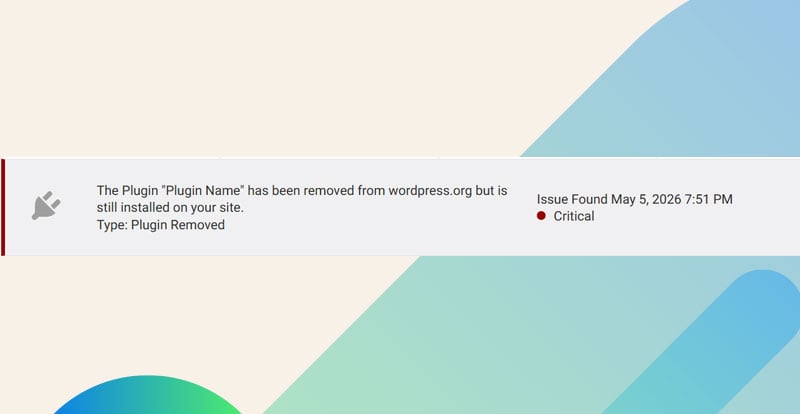

If Wordfence tells you a plugin has been removed from WordPress.org, don’t panic and don’t delete it immediately without checking a few things first. This warning can look scary because it sounds like WordPress has kicked the plugin out for something serious. Sometimes that is true, but a lot of the time it is not an urgent security issue.
The key is to separate three possibilities: the plugin was removed for an administrative or policy reason, the plugin was abandoned and is no longer being maintained, or the plugin was removed because of a real security issue such as malware. Those situations should not be treated the same way.
First, check the plugin page on WordPress.org
The first thing I check is the plugin’s page on WordPress.org. Even if the plugin has been removed from the repository, there is usually still a plugin page available. That page can give you important context before you make a decision about deactivating it, replacing it, or keeping it temporarily.
On that page, I look for a few practical details:
- Whether WordPress.org shows a removal notice
- The plugin’s support threads, especially recent ones
- The last updated date
- Recent user reports about broken features, warnings, or security concerns
- Whether the developer has posted an explanation
The support threads are especially useful. Sometimes a plugin is temporarily removed because of a WordPress.org guideline issue, a licensing question, a required code change, or a review process. In those cases, you may see the plugin author responding to users and explaining what is happening. That is very different from a plugin that has no developer replies, no recent updates, and several users asking why it disappeared.
If the Wordfence scan does not report any other issues, I usually do not rush to remove the plugin. A removal notice by itself is a signal to investigate, not automatic proof that the plugin is infected or unsafe.
Removal from WordPress.org does not always mean the plugin is vulnerable
One of the biggest mistakes I see site owners make is assuming that removal always means there is a vulnerability. That is not how I treat this warning. WordPress.org can remove plugins for several reasons, and some are more urgent than others.
Common reasons include violations of WordPress.org rules, unresolved review issues, licensing problems, developer account issues, or code that needs to be changed before the plugin can be listed again. These situations can be temporary. The plugin might come back after the developer fixes whatever WordPress.org flagged.
The urgent scenario is malware. If the plugin was removed because it contained malware, was compromised, or is actively being exploited, that is a different situation. In that case, we should remove or replace it. I would not keep a plugin installed if there is credible evidence that it contains malware or is being used to compromise sites.
This is where Wordfence helps. If Wordfence found malware, a known vulnerability, modified plugin files, or suspicious code, it would usually tell you in the scan results. So if the only warning is that the plugin has been removed from WordPress.org, and there are no malware findings or vulnerability alerts, I treat it as something to investigate carefully rather than an immediate emergency.
What I check inside Wordfence before removing anything
After checking the plugin page, I look back at the Wordfence scan details. I want to know whether Wordfence is only saying the plugin is no longer available in the repository, or whether it is reporting something more serious.
If Wordfence only says the plugin was removed
If the scan does not come up with any other issues, I usually keep the plugin for the moment while I investigate. That does not mean ignoring it forever. It means I do not want to create a new problem by deleting a plugin that powers important parts of the site when there is no evidence of malware or exploitation.
This is especially true for plugins tied to forms, checkout functionality, custom fields, redirects, memberships, events, or anything that affects how users interact with the site. Removing one of those without a plan can break pages, shortcodes, admin workflows, or stored data.
If Wordfence reports malware or another security issue
If Wordfence reports malware, suspicious files, a known vulnerability, or file changes that do not match the original plugin, I treat that as urgent. At that point, the question is no longer just “Why was this plugin removed from WordPress.org?” The question becomes “Is this plugin putting the site at risk right now?”
For a malware-related finding, I would remove or replace the plugin and then review the site for additional compromise indicators. Depending on the site, that may include checking admin users, recently modified files, unknown PHP files, cron jobs, redirects, and server logs.
Don’t delete a critical plugin without understanding what it does
If the removed plugin powers critical site functionality, I would slow down and talk to a developer (like us! We include plugin updates in our maintenance packages) before making changes. That might sound cautious, but it is the right move. If a plugin is required for the site, you do not want to take chances.
A developer can help answer questions like:
- What pages, templates, shortcodes, blocks, or features depend on this plugin?
- Does the plugin store important data in custom database tables?
- Will deactivating it remove front-end functionality or only admin tools?
- Is there a safe replacement with a migration path?
- Can we test the change on staging before touching the live site?
For example, if a removed plugin only adds a small admin convenience feature, replacing it may be simple. But if it runs appointment bookings, product options, form submissions, or membership access, deleting it immediately could cause real damage. In that case, the safer approach is to take a backup, test on staging, confirm what breaks, and plan the replacement.
How to tell if the plugin was already abandoned
A removed plugin may have been a risk long before Wordfence flagged it. One of the easiest ways to check is the last updated date on the plugin page. If it has been a long time since the plugin was updated, there is a good chance it has been abandoned or at least neglected.
I also look at the support forum activity. If users have been asking for help for months or years with no response, that tells me something. If the plugin has not been tested with recent versions of WordPress, that matters too. The longer a plugin goes without maintenance, the more likely it is to develop compatibility issues or miss important security changes in WordPress, PHP, or related libraries.
That does not always mean the plugin is dangerous today. Some simple plugins can go a long time without needing major changes. But abandoned plugins increase long-term risk because no one is actively fixing bugs, reviewing security reports, or keeping the code aligned with current WordPress standards.
This is one reason I like having Wordfence running. It helps protect the site for the most part from old plugins by flagging known issues, file changes, malware signatures, and repository removal notices. It does not replace good maintenance, but it gives us more visibility.
How I decide whether to keep, replace, or remove the plugin
I usually think about the decision in terms of evidence and impact. If Wordfence only reports that the plugin was removed, the plugin page shows a recent update, the developer is active in support threads, and there are no other scan findings, I may keep it temporarily and monitor it.
If the plugin has been removed, has not been updated in a long time, has no developer activity, and is not critical to the site, I would lean toward replacing or removing it. There is no reason to keep unnecessary abandoned code installed.
If the plugin is critical and appears abandoned, I would plan a migration rather than make a sudden change. That means identifying an alternative, testing the replacement, checking whether data needs to be exported or migrated, and scheduling the change at a low-traffic time if the site is active.
If there is malware or a confirmed security issue, I would remove or replace it as soon as possible. That is the clear urgent case. A temporary WordPress.org policy removal is usually not the same thing as a compromised plugin, but a malware finding should be treated seriously.
Checklist for this Wordfence warning
When this warning appears, here is the process I would follow before deciding what to do:
- Open the plugin page on WordPress.org. Even if the plugin is removed, check the page for notices, update history, and plugin details.
- Read the support threads. Look for updates from the developer or reports from other users.
- Check the last updated date. If it has been a long time, treat the plugin as a possible long-term maintenance risk.
- Review the full Wordfence scan result. Confirm whether it only reports repository removal or also reports malware, vulnerabilities, or file changes.
- Decide how important the plugin is. If it powers critical site functionality, do not remove it blindly.
- Talk to a developer if the plugin is required. Get help testing, replacing, or safely migrating away from it.
- Remove or replace it immediately if malware is involved. Malware changes the priority and should not be treated as a wait-and-see issue.
The main point is that this Wordfence notice is a warning sign, not always a disaster. Lots of people panic when they see it, but it is usually nothing to worry about if Wordfence is not reporting anything else. We still need to check the plugin page, read the support threads, and think about whether the plugin is actively maintained. If the scan is clean and the removal looks temporary, keeping it for a short time can be reasonable. If the plugin is abandoned, critical, or connected to a confirmed security issue, then we need a more careful plan.